SEO
For some map projects it is important to be found in the search engines and to specify the settings. We support the SEO optimization on the one hand with automatic processes and on the other hand with manual settings.
Automatic SEO Optimization
- Improvement of the indexing of map contents, such as popups and articles, by giving each of these contents its own static page, which is indexed by the search engine. Map users / map visitors / readers are forwarded from these indexed, static pages to the corresponding content in the map. Search results lead the reader directly to the content within the map.
- Use the canonical meta tag to link static content to dynamic map content. If the dynamic content is on a different domain, this will be taken into account when linking.
- Limit the number of characters in the page title and the description meta tag to prevent a negative SE ranking.
- OpenGraph Meta Tags are provided for all content so that it can be better displayed and formatted by search engines and social networks.
Manual SEO Optimization in SEO Settings
-
Optionally a SEO description can be added, which will be displayed in search results (relevant for all subsequent scenarios of map publication).
-
Automatic integration of the SEO description as alternative content for the map if it is embedded as iFrame or image in another page.
-
Optional specification of the individual URL in which the map is embedded to ensure optimal canonical meta tag forwarding (see scenario 2).
-
An optional CNAME setting allows the use of a CNAME forwarding, or a custom (sub)domain on which the map is displayed.
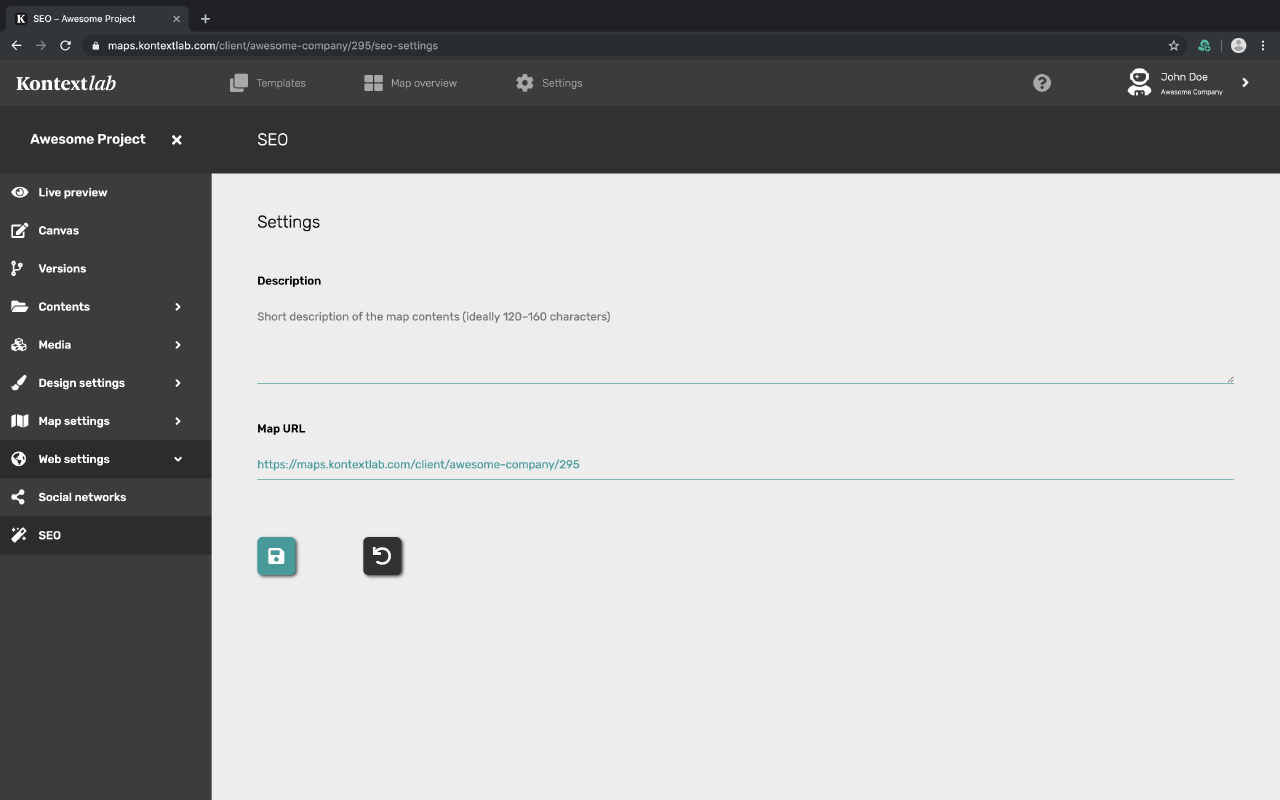
Description
Enter a concise description of your map here. The ideal number of characters is 120-160.
Map-URL
Enter the final URL of your map here. If you have included the map on a website, enter the URL of this subpage here.
SEO optimization for various publication scenarios
Szenario 1: Map is published on the standard Kontextlab-URL
All content is located on our domain maps.kontextlab.com and is indexed with this domain/URL. There are no copies of the contents. An integration via iFrame, CNAME or as image is not necessary.
Szenario 2: Map is integrated via iFrame or div-embed code on your own domain
The map is created in the CMS on maps.kontextlab.com and will be displayed/subdomained on your own domain/subdomain. For this we offer two ways: Embedding via iFrame + Deeplink-Script or via div embed-code + Deeplink-Script. If you want that the contents of this integrated map can still be found by the search engines, we offer on the one hand the possibility to store additional information in the individual, manual SEO settings and on the other hand a canonical meta tag for redirecting the indexed search results to the domain with the integrated map.
This means that the contents of the map are first indexed on maps.kontextlab.com by the search engines using the original URL. So that the forwarding of the search results to the corresponding subpage of the map (deep link to the found map content) within the integrated page can happen, the domain of the page in which this is integrated can be deposited in the backend of the CMS for each map. Thus a so-called canonical URL is deposited, which makes it possible to forward from the original URL of the map to the URL of the integrated map. This means that static content is linked to the dynamic map content. If the dynamic content is located on another domain, this is taken into account in the link.
In order to optimize the search engine result for this case, we recommend to add a short description in the SEO settings of the map. When the integrated map is uploaded on your own (sub)domain, this description is automatically integrated into the Embed-HTML page as alternative iFrame text.
Szenario 3: Map is transferred via CNAME to your own (sub)domain
In this scenario the map is created in the CMS initial via maps.kontextlab.com. Unlike the integration of the map in a separate domain CNAME forwarding allows the complete map and all its contents to be forwarded to the separate (sub-)domain, so that the kontextlab URL of the map no longer appears. This means that thanks to CNAME forwarding not only the map content is displayed on this domain, but also that the indexing by the search engines is no longer done on the Kontextlab URL, but directly within the (sub)domain to which the map is forwarded. Thus CNAME offers the most ideal configuration for an optimal indexing by search engines.
In order to create a CNAME redirection, a separate (sub-)domain is first created at your own web host. In order to then forward the map as a whole to it, only the CNAME information for the target URL has to be stored in the Kontextlab CMS. In order to make it easier for search engines to recognize various map projects as independent projects, Kontextlab CMS supports CNAME forwarding for each map project. This means that each map project can be assigned to its own (sub)domain.